


Last month I traveled to the southern Oregon coast to do some exploring. Bandon, a little town on the southern Oregon coast, was my base. One of the things that I was hoping to accomplish while there was to attempt some star photographs.
The last time I tried to get some star shots, I was in a location with too many trees, and a bit of a moon. I got lucky on this trip as there was no moon, and the skies were completely clear the evening of September 22.
I waited until a bit after 10 pm that night to make sure that the sky way really black – no twilight. I was hoping that it would be dark enough on the beach to catch a glimpse of the Milky Way, which in the northern hemisphere is generally to the south.
The beach was a short hike down the hill and through some trees and grass. And after spending a few minutes on the beach in the dark, letting my eyes adjust, I looked to the south, and there was our galaxy – the Milky Way!
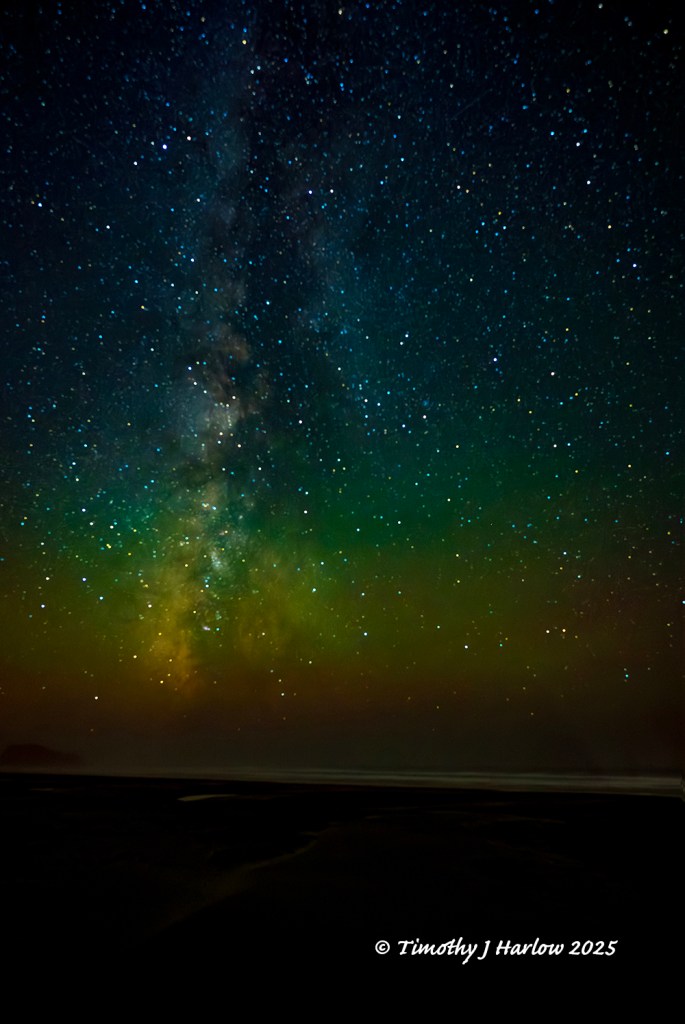
Prior to these shots, I had been doing some homework, looking up information about exposures, color temperatures, and the best lens length. As we know, the Earth revolves on its axis, so when making star photos there are really two approaches – keep them as sharp as possible, or use really long exposures to make the star tracks.
For these photos, I set my exposure to 13 seconds at f 2.5 or 2.8. To get enough light onto the image sensor to really capture the best images of the stars, you must use a fairly high ISO. However, all things being equal, the higher the ISO the more noise in the photo. So, what is noise?
Technically, it is two things. First, the camera image sensor picks up tiny amounts of electrical interference from the camera’s internal electronics producing tiny bits of fuzziness in a photo. And at low light levels, there aren’t enough photons hitting that image sensor to always produce perfectly sharp images. So, that also produces a bit of fuzziness. Noise is kind of like grain in the film world.
Therefore, I tried a few ISO settings, and ended up at about 2000. I then brightened the images in Photoshop. I found this worked better than the higher ISO like at say, 6400.

While I was in Bandon on a previous day, I met another photographer who was also going to do some night photos. We talked quite a bit about the noise issue, and he told me that one thing he did to help reduce noise was to “stack” several images in Photoshop to form one image with several layers. You can tell Photoshop to align the like objects, and it also gets rid of unmatched things like noise. He said that by stacking the images, Photoshop ends up reducing more of the noise than you could do in just one image.
The vertical star shot is composed of 4 stacked images, while the horizonal image above is from 3 stacked shots. I think the stacked image is sharper than each of the individual images, so perhaps there is something to this idea. The gentleman I spoke with in Bandon told me he usually stacks about 10 to 16 images.
Next time, I think I should bump up the ISO to more like 4000. The photos could be a bit brighter. I still have a lot to learn, but I think I am making some improvements. Hopefully, you enjoy these photographs, and I didn’t put you to sleep with the shop talk.
As always thanks for stopping by, and have fun out there!


 Tim's Viewpoints & Visuals
Nice shots!
You make the road by walking it.
Ben Macri
LikeLiked by 1 person
Thanks Ben!! I hope you all are well.
LikeLike